
How to map search intent with AI instead of doing it manually
Why manual search intent mapping is breaking your SEO

You are staring at a spreadsheet containing 4,500 raw search queries. It’s 4:00 PM on a Friday. Your job is to manually tag each row as informational, commercial, transactional, or navigational. By row 150, your eyes glaze over. By row 400, “best enterprise CRM” and “enterprise CRM pricing” start looking exactly the same.
This is the unspoken bottleneck of modern SEO. We spend thousands of dollars on databases to pull massive keyword lists, only to dump them into static spreadsheets where human fatigue takes over. The error rate is quietly staggering. A tired strategist will misclassify up to 30% of a mid-sized dataset, leading to misaligned briefs and wasted writer hours.
And honestly, the old way of learning how to find search intent by eyeballing SERPs (search engine results pages) simply can’t scale. Search behavior changes overnight. What Google categorized as informational last month might be a transactional comparison grid today. Relying on static human intuition means you’re always building your content strategy on lagging indicators.
This manual bottleneck is a massive operational leak for marketing agencies. When you misjudge what searchers actually want, your writers produce articles that never stand a chance of ranking. Of course, manual mapping works fine for a tiny list of twenty keywords, but it breaks down instantly when you scale.
If you’re still classifying keywords row-by-row, you’re bleeding billable hours. Teams need a repeatable, programmatic approach. Learning how to map search intent with AI is no longer a futuristic shortcut,it is a baseline operational requirement for scaling organic traffic without burning out your strategy team.
The hard math behind the spreadsheet bottleneck
The spreadsheet bottleneck by the numbers
Let’s look at the raw numbers behind manual seo keyword mapping. If you assign a junior strategist to categorize a standard dataset of 2,000 search queries, they’ll hit a wall quickly. Industry benchmarks show manual tagging rates average roughly 30 keywords per hour when looking up SERPs manually.
To process those 2,000 queries, your team must spend roughly 66 hours staring at spreadsheets. If you pay an internal rate of $35 per hour, that single mapping exercise costs you $2,310 in direct labor. And that doesn’t even account for the inevitable mental fatigue that leads to misclassification errors after hour three.
But the opportunity cost is where the real damage happens. While your specialist is manually sorting informational queries from transactional ones, they aren’t building campaigns, optimizing existing content, or speaking to clients. This operational drag is a primary reason why manual blog production is draining your agency’s profits and capping your ability to scale. You’re paying premium strategy wages for low-level data entry.
Now, compare that to an automated AI classification workflow. A basic LLM script can process those same 2,000 keywords in under ten minutes. The API cost for running those inputs through a modern model sits at less than $3 total. Even if you factor in a human-in-the-loop audit taking two hours to clean up edge cases, your total cost drops to around $73.
So, you save over $2,200 and reclaim 64 hours of execution time on a single project. Of course, these exact savings can vary depending on your team’s internal efficiency, but the financial margin recovery is undeniable. Transitioning your staff from manual data entry to strategic editors is the only logical way to handle modern search data at scale. It turns a week-long bottleneck into a morning task.
How AI models crack the code: semantic embeddings vs keyword strings

Traditional SEO relied on exact-string matching. If a user searched for “apple stock price,” a basic regex script looked for “apple,” “stock,” and “price” in sequence. But human language is messy. When someone queries “should I buy apple,” the intent shifts from informational to commercial, even though the core noun is identical. Legacy tools fail here because they lack context.
Vectors vs strings: the semantic shift
Semantic embeddings solve this. Instead of treating words as static text strings, modern keyword classification ai systems convert queries into dense vector representations. These vectors map words into a multi-dimensional space based on semantic similarity. In this vector space, “should I buy apple” sits closer to “AAPL investment outlook” than to “apple pie recipe,” despite sharing the word “apple.”
Choosing your model: BERT vs LLMs
For modern search classification, engineers typically choose between BERT-based models and generative Large Language Models (LLMs). BERT models are highly cost-effective and fast at scale. They process millions of keywords efficiently because they analyze the context of a word in relation to all other words in a sentence bi-directionally, rather than processing tokens sequentially. If you run a database of 100,000 queries through a fine-tuned BERT model, it costs pennies and finishes in minutes.
But BERT struggles with highly subjective or multi-intent queries.
That is where LLMs come in. While computationally expensive, LLMs have the reasoning capacity to resolve complex edge cases. Take the query “best way to get over a cold fast.” Depending on search context, this could be informational or commercial. An LLM evaluates the nuanced phrasing to determine if the searcher wants home remedies (informational) or over-the-counter medicine (commercial).
Using LLMs for every single keyword is overkill. A hybrid pipeline is more practical. You can run BERT for 90% of your standard bulk classification, then route the ambiguous 10% to an LLM. This keeps your pipeline fast and cost-effective. It lets you build an AI blog generator workflow that targets the exact search intent of your audience without blowing your budget on API calls.
Step 1: Building a strict LLM prompt architecture
Designing the system prompt for deterministic classification
Ask a standard LLM to classify keywords, and it will usually start chatting. It explains its logic, apologizes for weird edge cases, and invents useless hybrid categories like “Commercial-leaning Informational.” That unpredictability ruins database imports.
You need clean, parseable data. To get it, you have to lock down the model’s behavior with a strict system prompt. The goal is simple: force the LLM to act as a deterministic classifier. It must output only structured formats like JSON or CSV. No conversational fluff allowed.
Here is a prompt template you can copy and paste into your API setup:
Role: You are a deterministic SEO classification engine.
Task: Analyze search intent with AI for the provided list of search queries.
Rules:
1. Categorize each query into exactly one of these categories: Informational, Navigational, Commercial, Transactional.
2. Output the results strictly as a raw JSON array of objects.
3. Do not include markdown formatting, backticks, explanations, or introduction text.
4. If the intent is highly ambiguous, default to the most common commercial search pattern.
Input format: [list of queries]
Output format: [{"query": "example", "intent": "Informational"}]
Managing edge cases and parser errors
LLMs still slip up. Even with strict rules, they might wrap your JSON in markdown backticks or add a polite “Here is your data” at the start. If you are writing a custom Python script, build a basic cleanup function. You need to strip those extra characters before running the parser.
Managing API keys, prompt drift, and JSON parsing is a lot of overhead. If you want to skip the manual coding, platforms like the GenWrite content automation pipeline handle this classification work in the background.
Let’s be honest: no prompt is perfect. Ambiguous keywords like “apple” force the model to guess unless you feed it live SERP data. But for 90% of your keyword backlog, this basic setup works. It cuts out the manual spreadsheet sorting immediately.
Want to make it even more reliable? Use few-shot prompting. Give the model three examples of inputs and their exact expected outputs. This simple addition stops the LLM from hallucinating random tags. It is incredibly useful for niche B2B keywords where search intent isn’t obvious to a general model.
Step 2: Feeding the pipeline with bulk keyword data
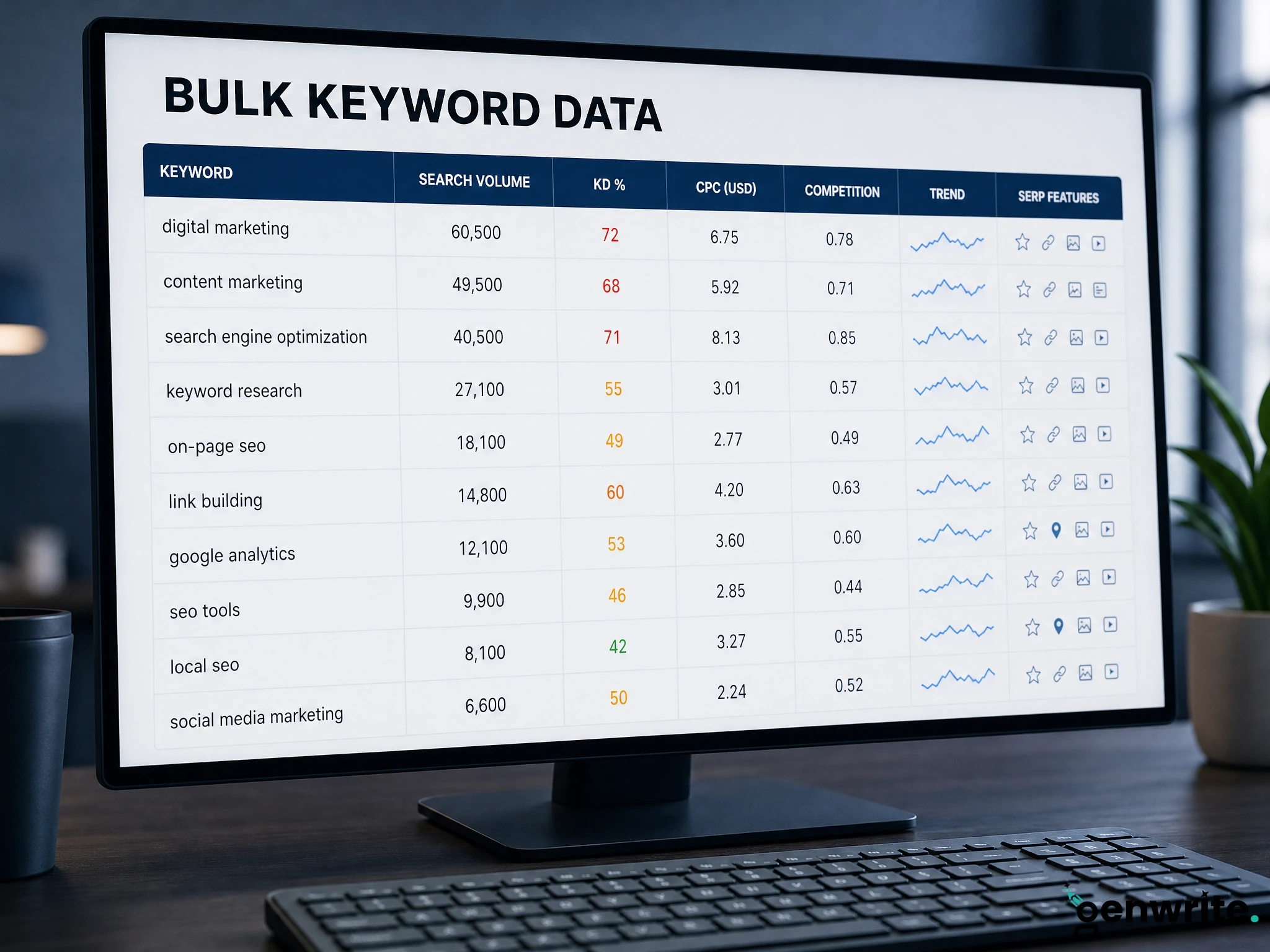
If you paste a list of 5,000 keywords into a standard ChatGPT window, you’ll break it. The interface might look like it’s working, but it quickly gets tired, drops rows, or groups your data into generic buckets that don’t help your SEO. To map search intent at scale, you need to move beyond standard chat boxes.
When you use a generic chat interface, you run into context window limitations and output token caps. The LLM gets lazy. It starts summarizing halfway through your list. We’ve seen tests where standard models simply stopped processing after line 150, quietly fabricating the rest of the results or hallucinating patterns. It’s why relying on basic prompts fails when you need actual data accuracy. You can read more about how generic chat interfaces fail compared to specialized SEO writing tools that use live search data rather than static training models.
| Feature | Generic Chatbots | API & Specialized Tools |
|---|---|---|
| Batch Limits | Often caps at 50-100 rows before skipping data | Processes thousands of rows via automated loops |
| Data Integrity | High risk of hallucination and generic grouping | Strict JSON schema enforcement per keyword |
| Customization | Hard to maintain strict system prompt rules | Easy to enforce exact classification categories |
To map intent at scale, you need a dedicated programmatic pipeline or a dedicated ai keyword tool. By querying the API directly, you can send keywords in small, isolated batches of 50 to 100 keywords per call. This keeps the model focused and prevents it from cutting corners. Or, you can use specialized platforms that automate this batching logic under the hood without requiring you to write python code.
Now, even with a clean API setup, you’ll still get occasional misclassifications. No machine model is 100% accurate on search intent, especially when keywords have double meanings. But processing your dataset programmatically at least ensures every single keyword actually gets analyzed instead of being skipped entirely. You end up with clean, structured data that you can actually use to build your content plan.
Step 3: Beyond traditional intent—mapping conversational AI prompts
Beyond traditional intent,mapping conversational AI prompts
Traditional keyword lists are dying. People don’t search in two-word fragments when talking to an AI assistant. They ask multi-clause questions, upload screenshots, and demand immediate, synthesized answers.
This shift means traditional keyword search intent analysis has to adapt. If you’re still classifying keywords as just informational or transactional, you’re missing where the traffic is actually going. We’re moving into the era of Generative Engine Optimization (GEO), where the goal isn’t just ranking blue links, but earning citations inside LLM responses.
Conversational engines like Perplexity or ChatGPT use a highly specific taxonomy. Users prompt these systems to compare, analyze, and make decisions in a single session. To capture these searchers, your content needs to match these multi-step prompts.
For example, a user no longer searches “best CRM.” They type: “Compare HubSpot and Salesforce for a 10-person agency, focusing on ease of setup, and tell me which is cheaper.”
If your content doesn’t explicitly structure its data to answer that exact multi-layered comparison, an LLM will ignore your page. You must design your content architecture to feed these engine algorithms what they need: structured tables, clear comparisons, and direct answers.
This is where manual content planning falls apart. Trying to manually map these complex, conversational queries to your content calendar is a massive waste of resources. Using an advanced AI blog generator allows you to automatically analyze these multi-part prompts and structure your articles to trigger these specific LLM citations.
To align your content with GEO, you must focus on three primary citation triggers. First, place your direct answers in the very first sentences of your paragraphs. Second, use clear, unstyled tables to present raw comparative data. Third, call out specific user segments directly in your subheadings so the algorithm can easily match your text to highly targeted prompts. You cannot afford to hide your best insights deep within long paragraphs of fluff.
Honestly, GEO is still a bit of a moving target, and search engines change their citation algorithms frequently. But the core principle remains: clear, structured data wins. If you continue to rely on manual, outdated keyword matching strategies, you’ll quickly find your organic visibility dropping as conversational search takes over. And that means missing out on high-intent buyers who rely entirely on AI to make decisions. So, stop optimizing for single keywords and start structuring your pages to answer complex, multi-step prompts.
Step 4: Isolating the gap using automated SERP checks

Imagine your LLM classifies “best payroll software for small business” as informational because of the word “best.” You spend hours writing a deep-dive guide, but Google’s actual search results page displays nothing but product comparison grids and pricing tables. That mismatch is where most automated pipelines fall apart. If your tool doesn’t look at live search results, it’s just guessing in a vacuum.
Verifying intent against live search results
To fix this, we have to run automated SERP scraping alongside our initial classifications. We look at the “three Cs”: content type, format, and angle. If the top five results are listicles, your content must be a listicle. But doing this manually for thousands of queries is impossible. By pulling live SERP data via APIs, we can instantly cross-reference our ai seo content generator predictions with actual Google reality. This verification step ensures we don’t build content that search engines will immediately ignore.
Sometimes, the API returns mixed signals, especially when Google is testing new layouts. That’s why your script should flag queries where the top organic results don’t share a clear format. For instance, if result one is an e-commerce category page, result two is a forum, and result three is a blog post, the intent is fragmented. This is where advanced ai keyword research needs a safety net. GenWrite handles this by analyzing competitor structures directly, making sure you target the dominant intent layout.
Building the automated validation loop
Or you can set up a simple script using Python and a SERP API to fetch the HTML of the top five ranking pages. Have your LLM analyze those page titles and meta descriptions to extract the dominant content format. If the API output conflicts with your initial intent tag, flag it for a quick manual review. It takes an extra step, but it saves you from publishing hundreds of pages that never stand a chance of ranking.
How to avoid the lazy AI classification trap
Spotting the default path of least resistance
I recently watched a content team run a batch of 4,500 real estate keywords through a standard API classifier. Within minutes, the model tagged both “best CRM for agents” and “CRM pricing comparison” under the generic umbrella of “Commercial.” Technically, it wasn’t wrong. But practically, it was useless for building an actual editorial calendar because it missed the subtle shift from exploratory research to immediate buying intent.
This is the lazy AI classification trap in action. Large language models (LLMs) are inherently built to find the easiest path. When faced with massive keyword lists, they’ll often default to broad, safe categories rather than doing the hard work of parsing subtle search modifiers. If you rely solely on raw machine outputs without a validation step, your content pipeline suffers. You’ll end up targeting the wrong stage of the funnel with the wrong content format.
To fix this, we implemented a simple human-in-the-loop audit inside our ai workflow for SEO. Instead of accepting the first pass, we pull a random sample of 5% of the categorized keywords. We specifically look for high-volume terms where the user intent is mixed. If the AI labeled “how to use CRM software” as transactional just because the word “CRM” is present, we know the system prompt needs tightening.
This same systematic laziness happens when generating copy. If you don’t watch the outputs closely, the resulting articles feel incredibly formulaic. We wrote a practical blueprint on fixing these robotic drafts and reclaiming organic search intent when your seo writer ai gets lazy.
The reality is, automation works best as a collaborative partner, not a hands-off replacement. By setting up automated intent validation rules (like flagging queries containing “how to” that were categorized as transactional), you can catch these lazy groupings before they mess up your content strategy.
Troubleshooting your automated classification workflow
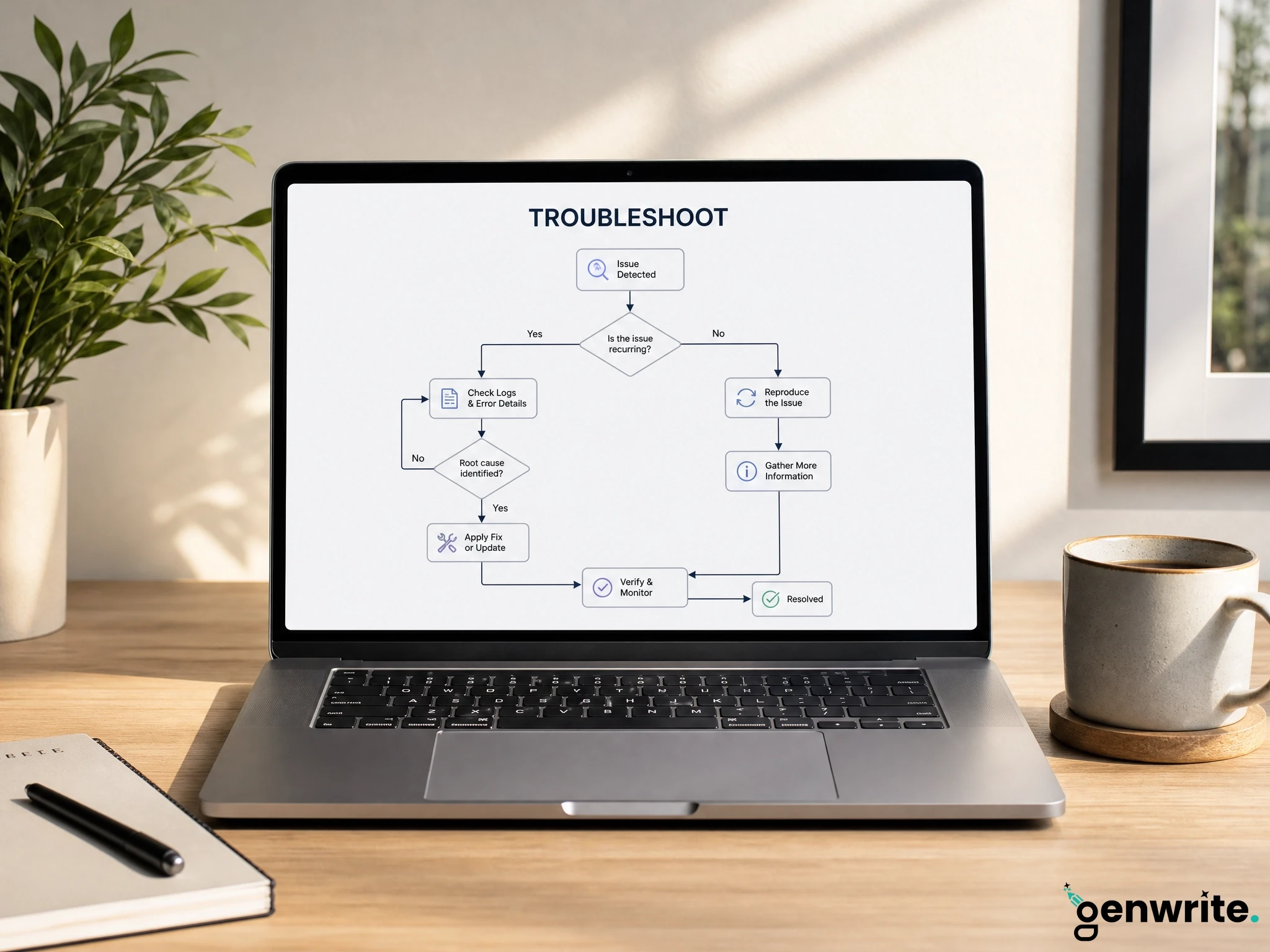
What happens when your automated pipeline hits a wall? When you scale up to analyze search intent with ai, the transition from a small-scale test to bulk execution exposes brittle code and logic gaps. If you’ve ever stared at a crashed Python script or a spreadsheet full of “RateLimitError” messages, you’re not alone.
How do you handle API timeouts and token limits without losing your progress? When processing thousands of rows, sending single requests sequentially is a recipe for a timeout. But if you batch too aggressively, you’ll hit token rate limits (TPM) or requests per minute (RPM) caps. The fix is simple: implement exponential backoff with jitter in your script. This pauses your requests dynamically when the API signals throttling, rather than crashing the run. It’s also smart to cache your results locally, so if the script fails at row 800, you don’t have to pay to re-analyze the first 799.
Why is your model misclassifying mixed-intent queries? A common headache is when the AI labels “best project management software” as transactional. In reality, it’s commercial investigation. LLMs often get tripped up by words like “best” or “cheap,” defaulting to transactional because they associate purchasing with product names. To solve this, you must refine your system prompt with clear negative constraints. Tell the model explicitly: “If the query contains ‘best’, ‘top’, or ‘vs’ and compares options, it must be classified as commercial, not transactional.”
Is your data pipeline clean before it even reaches the LLM? Sometimes the issue isn’t the AI, but the raw keyword list. Duplicate queries, random HTML characters, and non-alphanumeric symbols inflate your token usage and confuse the vector embeddings. Running a basic regex cleaning pass first saves money and prevents erratic classification. If you want to bypass these scripting headaches entirely, using a dedicated content automation platform can simplify the entire data prep and analysis lifecycle without manual coding.
The long-term play: turning automated intent into organic revenue
Operationalizing automated search intent for compounding returns
Automating your intent mapping isn’t just about saving hours on spreadsheets. It’s about building a system that scales your organic traffic without losing quality. When you learn how to map search intent with ai, you unlock the ability to target hundreds of long-tail keywords that your competitors are ignoring because they’re too slow to find them.
But what happens when you start publishing this AI-assisted content? Many teams worry about search engine penalties. The reality is that search engines prioritize helpfulness and user satisfaction over the tool used to write the words. If you’re wondering how google detect ai content or if it even matters, the truth is simple: search engines care about whether you satisfy the searcher’s query, not whether you used an LLM to organize your data.
So, how do you turn this automated pipeline into actual pipeline revenue? You start small. Run a batch of 50 keywords through your prompt classifier, verify the outputs manually, and build your content briefs around those validated intents. This hybrid approach ensures you maintain editorial control while moving ten times faster than before. Over time, these small batches compound into a massive library of highly targeted assets.
And let’s be honest: the old way of doing SEO is dying. You can’t win the organic search game by manually reviewing thousands of queries every month. By deploying an automated classifier, you free up your content team to focus on what actually drives conversions: product positioning, original research, and high-converting copy. That’s how you turn raw search volume into predictable revenue.
Results will vary depending on your niche, and sometimes the AI will misclassify highly nuanced B2B terms. Yet, the efficiency gains are too massive to ignore. By shifting your team’s energy from manual categorization to strategic refinement, you build a sustainable engine that turns search visibility into actual customers.
Tired of spending hours sorting keywords in spreadsheets? GenWrite automates your keyword intent mapping and content creation so you can scale faster.
Frequently Asked Questions
Can AI really categorize search intent better than an SEO expert?
Honestly, yes, when you feed it the right system prompts. AI doesn’t get fatigued after sorting five thousand keywords, and it spots semantic nuances that humans usually miss in massive spreadsheets.
How do I handle ambiguous keywords that fit multiple intent buckets?
You’ll want to cross-reference the AI’s prediction with live SERP features. If a keyword shows both informational blogs and product pages in the top ten results, your prompt needs a hybrid category.
Does Google penalize automated search intent classification?
No, because you’re using AI for the research and planning phase, not publishing unedited garbage. Google cares about content quality, not whether a spreadsheet or an LLM helped you group your keywords.
What’s the best way to stop the AI from guessing intents?
Strict formatting constraints and few-shot examples inside your system prompt work best. If you don’t give it explicit rules and output definitions, it’ll just hallucinate based on surface-level keyword strings.